1.2k views
in Embedded Wizard Studio by
Hi,

In documents, Embedded Wizard 9.10 \ Examples \ Menus

In this Example,

I enter to Sound settings and modify values(like bass ,volume Offset...)  then back to the main menu

When I enter to Sound settings again, values which I modified didn't change.

How to save these changes after I back to the main menu ?

Thanks!


Best Regards,

Andy Dong

1 Answer

0 votes
by

Hello Andy,

I'm a little bit confused... I just opened the example 'Menus' and could see that all Sound settings are stored and properly displayed with the latest values when a submenu is opened again.

All values are stored within the ControllerClass which is a DeviceClass to interact with an underlying API. Each time a menu is reopend, all widgets get their current values from the corresponding member of the ControllerClass (via Outlet).

The following members can be found within the ControllerClass in order to store the current settings and to forward it to a real system.

Best regards,

Manfred.

by

Hi, Manfred.


I add the below code in "openSoundMenu"

var Example::ControllerClass data = new Example::ControllerClass;    

trace "VolumeOffset" , data.VolumeOffset;

First I enter to SoundMenu the VolumeOffset is default value 50

After I change the value , I enter to SoundMenu again

it still print VolumeOffset = 50.  Why?

Thanks!!


Best Regards,

Andy Dong

by
Hi, Manfred.

Thanks for your reply.

I just misunderstand some details.


Best Regards,

Andy Dong
by

Hi Andy,

as I can see in your log window, you are running the class Example::TopMenu within the Prototyper and not the application class Example::Application. Just try it again with the application class (or simply press Ctrl + F5) - then everything will work as expected.

Why does it not work when prototyping the top menu?

The reason for the bahavior is, that the ControllerClass is a autoobject which is removed by the garbage collecter when it is no more in use (= when you close the submenu) and it is created again when it is needed (= when you open the submenu).

In order to keep the autoobject within the memory and to prevent the Garbage Collector from deleting it, you will find a variable within the application class that keeps a permanent reference to the controller object.
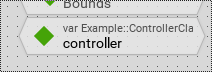
As a result, the controller is kept in the memory the whole runtime of the application.

For more details, please have a look to the description of autoobjects - especially the section lifetime of autoobjects.

Best regards,

Manfred

by
Hi,Manfred

It really really helps me a lot

Oh that's why !

In my own project , I didn't add a variable within the application class that keeps a permanent reference to the autoobject.

Now I understand

Thanks a lot .


Best Regards,

Andy Dong

Ask Embedded Wizard - Archive

Welcome to the Ask Embedded Wizard archive. This community forum served us well for many years, but we've evolved our support approach!

Your resources:

The Embedded Wizard Online Documentation provides comprehensive documentation, tutorials, examples and ready-to-use software packages.

For dedicated assistance, explore our Embedded Wizard Product Support.

You can still browse the valuable discussions from our community history here.

Embedded Wizard Website | Privacy Policy | Imprint

...