1.8k views
in Getting started by

Hello Everyone,

I am using raspberry pi 3 model B with Debian stretch operating system

I have been trying to do Hello World App. however i am faced with below error

mkdir cannot create /obj directory permission denied as shown below

1 Answer

0 votes
by

Hello,

it seems that you successfully shared your directory - but maybe the write access is disabled. Please check the settings of the shared folder.

Does it work?

Best regards,

Manfred

by
Thanks Manfred for your quick reply,

I have given read/write access to that folder ..

on other hand as well i tried using sudo chmod a+w to remove wirte protection on directories and allow make file to create obj directory and others but with no luck.

i am super rookie in embedded systems but trying to learn.
by

Hello All, 

I have managed to solve it by removing the dot before /obj and modified it in the make file to look like below:

###############################################################################
# GENERAL SETTINGS & PATHS
###############################################################################
EMWI_APP_PATH     = ../GeneratedCode

SRC_PATH          = ../Source

EMWI_RTE_PATH     = ../../PlatformPackage/RTE
EMWI_GFX_PATH     = ../../PlatformPackage/RGBA8888
EMWI_BSP_PATH     = ../../TargetSpecific
WIRINGPI_PATH     = /home/pi/wiringPi/wiringPi
OBJ_PATH          = /obj
BIN_PATH          = .

SDK_PATH          = /opt/vc
LIB_PATH          = $(SDK_PATH)/lib
 

but now i am faced with another error as follows that i am trying to solve as well
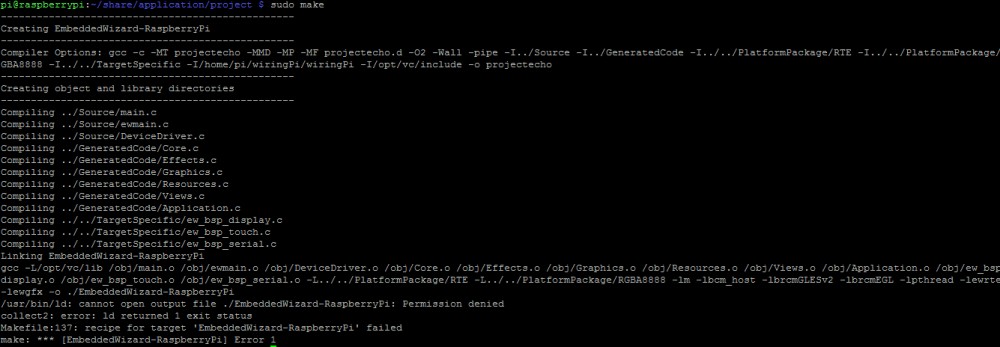
Best Regards

Kasem

by
Hello Kasem,

well, now the object files are stored on the RasPi and not on the shared directory of the Windows PC. Please try to get a proper write access to the shared folder - there should be no need to "fix" the makefile...

Best regards,

Manfred.
by
Hello Manfred,

Thanks a lot for your reply,

I have managed to solve it by changing the make file Bin path as follows:

###############################################################################
# GENERAL SETTINGS & PATHS
###############################################################################
EMWI_APP_PATH     = ../GeneratedCode

SRC_PATH          = ../Source

EMWI_RTE_PATH     = ../../PlatformPackage/RTE
EMWI_GFX_PATH     = ../../PlatformPackage/RGBA8888
EMWI_BSP_PATH     = ../../TargetSpecific
WIRINGPI_PATH     = /home/pi/wiringPi/wiringPi
OBJ_PATH          = /obj
BIN_PATH          = /usr/bin

SDK_PATH          = /opt/vc
LIB_PATH          = $(SDK_PATH)/lib


Best Regards

Kasem

Ask Embedded Wizard - Archive

Welcome to the Ask Embedded Wizard archive. This community forum served us well for many years, but we've evolved our support approach!

Your resources:

The Embedded Wizard Online Documentation provides comprehensive documentation, tutorials, examples and ready-to-use software packages.

For dedicated assistance, explore our Embedded Wizard Product Support.

You can still browse the valuable discussions from our community history here.

Embedded Wizard Website | Privacy Policy | Imprint

...
