763 views
in Embedded Wizard Studio by

I have tried to create an application for STM32F769 DICOVERY Board following the tutorials provided.

https://doc.embedded-wizard.de/quick-tour?v=9.20

https://doc.embedded-wizard.de/getting-started-stm32f769-discovery?v=9.20

I wanted a multi component application with a welcome screen, settings screen and so on .

But when i come to 'class appliaction' with the interleaved dialogs and start the prototyper the welcome dialog just wont disappear.

As inferred from the guide  i tried to edit the init method as given below
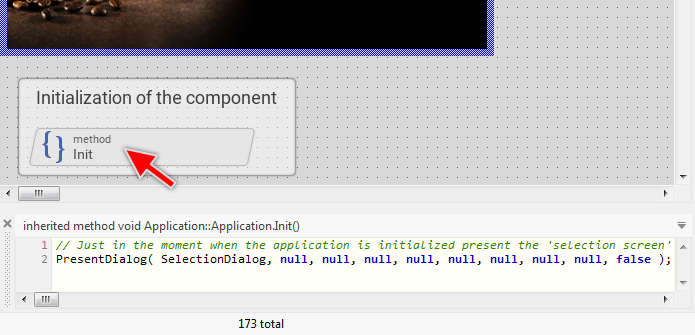
 

but to do so i cant find the init method in the composer but I found it in the inspector window .

So i copied the init from the inspector window to the composer and did all the subsequent steps to dissolve the welcome dialog for the later dialogs but it just doesn't work !

Is it because i copied the init method ?thats the only step i have done unlike what is told in the tutorial.

please help to find a solution.

1 Answer

0 votes
by

Hello,

the Init method is inherited from a basis class common to all GUI components. To implement code in the Init method, it is necesary to override it first. To not overload the reader in our Quick Tour the Init method is already overriden. Therefore there was already the Init brick visible in Composer. To override a method just follow the instructions found in the chapter Override an inherited method. This process is also explained later in the Quick Tour on the example of the method StopBrewing().

When you copy a method, you create in fact a new one which in this case is not related to the original method. Accodingly, the copied Init method is not invoked as expected.

Does it help you?

Best regards

Paul Banach

by
Hello paul ,

Actually i found the solution last day, anyway thankyou so much for your response !

Regards,

Hala

Ask Embedded Wizard - Archive

Welcome to the Ask Embedded Wizard archive. This community forum served us well for many years, but we've evolved our support approach!

Your resources:

The Embedded Wizard Online Documentation provides comprehensive documentation, tutorials, examples and ready-to-use software packages.

For dedicated assistance, explore our Embedded Wizard Product Support.

You can still browse the valuable discussions from our community history here.

Embedded Wizard Website | Privacy Policy | Imprint

...