498 views
in Embedded Wizard Studio by
Hello,

I would like to ask you how to use SimpleTouchHandler to cover a complex object (object contains more than 4 points). Is there any way to add more points to simpleTouchHandler or any other options for precise cover?

Thank you,

Anthony

1 Answer

0 votes
by
 
Best answer

Hallo Anthony,

Simple Touch Handler is limited to have 4 corners.  Its shape, however, is not necessarily a rectangle. You can form it as desired to cover as good as possible the corresponding area. Also possible, use two or even three Simple Touch Handler to cover a complex shape. Then connect all Touch Handler to the same slot methods. For example:
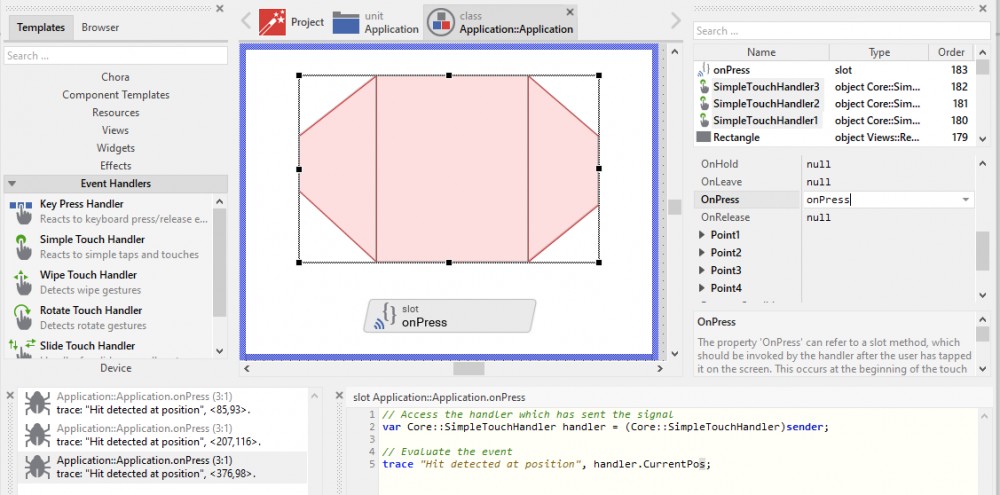
In the above screenshot please note, how the implementation of a slot method associated to several Touch Handlers does access the correct handler by using the value sender. Via the value sender , the Touch Handler provides a reference to itself. In this way the slot method can access the sending Touch Handler and e.g, evaluate its variable CurrentPos.

I hope it helps you further.

Best regards

Paul Banach

Ask Embedded Wizard - Archive

Welcome to the Ask Embedded Wizard archive. This community forum served us well for many years, but we've evolved our support approach!

Your resources:

The Embedded Wizard Online Documentation provides comprehensive documentation, tutorials, examples and ready-to-use software packages.

For dedicated assistance, explore our Embedded Wizard Product Support.

You can still browse the valuable discussions from our community history here.

Embedded Wizard Website | Privacy Policy | Imprint

...