664 views
in Embedded Wizard Studio by

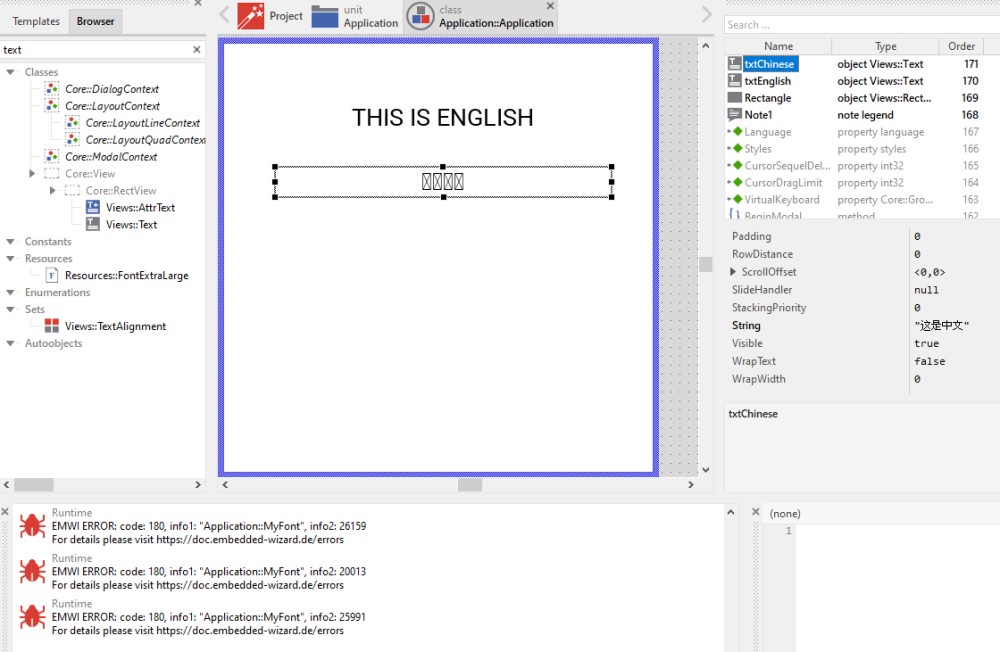
In EW 10.00 I have created a small project to try to display simplified Chinese text. Because the UTC range needed is higher than 127, I have created a font resource with a larger range. But I am unable to display the text in my text field- the error code is 180 (the glyph range error). I have even tried setting my font range to its maximum (0x01-0xFFFF) as a test. It still shows the same error. I have also tried using an import of FontRange.txt. Same error. As you can see below, even when I hardcode the simplified Chinese characters in the String field of my Views::Text object, I am unable to display them. Other than the font range, are there any other settings which could cause this error? Any help would be appreciated.

1 Answer

0 votes
by

Turned out I was using a font (Roboto) that did not support simplified Chinese. As soon as I changed to Tahoma, it works great...  blush

Regards,

Rob


Ask Embedded Wizard - Archive

Welcome to the Ask Embedded Wizard archive. This community forum served us well for many years, but we've evolved our support approach!

Your resources:

The Embedded Wizard Online Documentation provides comprehensive documentation, tutorials, examples and ready-to-use software packages.

For dedicated assistance, explore our Embedded Wizard Product Support.

You can still browse the valuable discussions from our community history here.

Embedded Wizard Website | Privacy Policy | Imprint

...