Hello Chaitra,
the problem is related to the line 3 in the method Application::Application.AlarmUpdate():
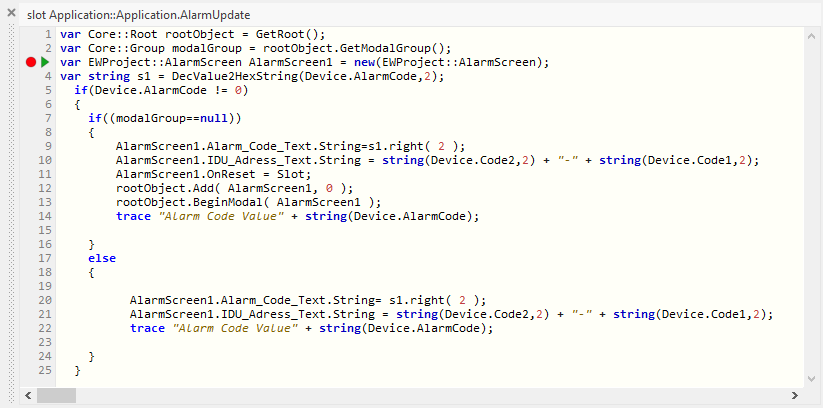
This method is called for each Property Observer notification. So far it works well. In the line 3 you create a new instance of the AlarmScreen GUI component. The problem here, each time the method is invoked a new instance is created. The following if-condition adds the AlarmScreen to the root object. This, however, is done for the first notification. The second and following notifications are processed in the else-branch. The condition modalGroup == null is false in this case because with the first notification you have one instance of AlarmScreen presented and made modal.
The code within the else-branch works correctyl. The problem is, it moddifies the objects of the just created new instance of AlarmScreen. On the screen, however, is shown the instance created at the first notification. You should rethink the implementation of the method. Following could be one possible implementation to fix the issue. Please note the inline comments:
var Core::Root rootObject = GetRoot();
var Core::Group modalGroup = rootObject.GetModalGroup();
var string s1 = DecValue2HexString(Device.AlarmCode,2);
  if(Device.AlarmCode != 0)
  {
    if((modalGroup==null))
    {
        // If there is no modal group visible -> create a new one now
        var EWProject::AlarmScreen AlarmScreen1 = new(EWProject::AlarmScreen);

        AlarmScreen1.Alarm_Code_Text.String=s1.right( 2 );
        AlarmScreen1.IDU_Adress_Text.String = string(Device.Code2,2) + "-" + string(Device.Code1,2);
        AlarmScreen1.OnReset = Slot;
        rootObject.Add( AlarmScreen1, 0 );
        rootObject.BeginModal( AlarmScreen1 );
        trace "Alarm Code Value" + string(Device.AlarmCode);

    }
    else
    {
          // ... otherwise use the previously created GUI component
          var EWProject::AlarmScreen AlarmScreen1 = (EWProject::AlarmScreen)modalGroup;

          AlarmScreen1.Alarm_Code_Text.String= s1.right( 2 );
          AlarmScreen1.IDU_Adress_Text.String = string(Device.Code2,2) + "-" + string(Device.Code1,2);
          trace "Alarm Code Value" + string(Device.AlarmCode);

    }
  }
Does it help you further?
Best regards
Paul Banach
