580 views
in GUI Development by

Hello,

I'm trying to modiify the "Paper Cutter" example,  my objective is to make it have a similar structure but different features.
 

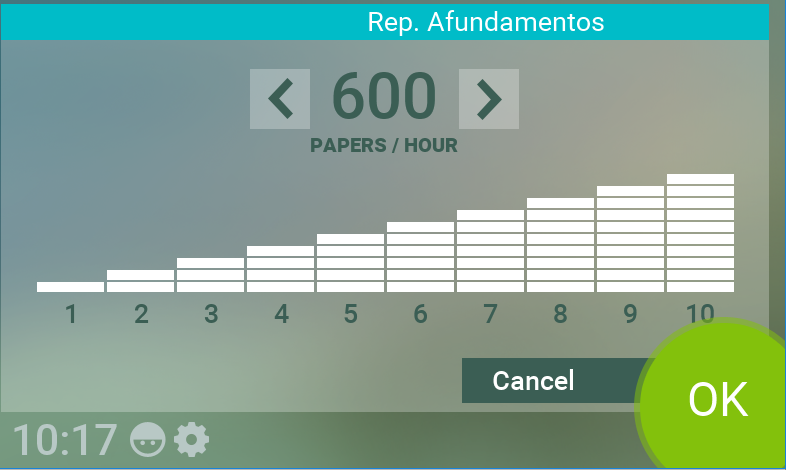
My first obstacle is that I can't make the Bar Graph in "Speed Dialog" present a 1 to 10 scale, it get stuck on 600 as a minumum value on the number text and also the bar graph animation doesn't follow it. 

I have changed the minimum and max value and also changed 'onIncrement' and 'onDecrement' slots to 

if ( PaperSpeed != null )
  PaperSpeed^ = (PaperSpeed^) + 1;

and

 if ( PaperSpeed != null )
  PaperSpeed^ = (PaperSpeed^) - 1;


Can you help me please?

Thank you,

Lucas
1 Answer

0 votes
by

Hello Lucas,

the component 'SpeedDialog' contains a property reference that refers to the value that is shown by this dialog: This property reference with the name 'PaperSpeed', is connected to the property 'PaperSpeed' that you will find in the Device Class 'Cutter::DeviceClass'. Within the onget method of the 'PaperSpeed' property you will find the code that limits the current paper speed in the range from 600 to 3600.

Best regards,

Manfred.


by
Hi Manfred, It worked.
Thank you so much.

Ask Embedded Wizard - Archive

Welcome to the Ask Embedded Wizard archive. This community forum served us well for many years, but we've evolved our support approach!

Your resources:

The Embedded Wizard Online Documentation provides comprehensive documentation, tutorials, examples and ready-to-use software packages.

For dedicated assistance, explore our Embedded Wizard Product Support.

You can still browse the valuable discussions from our community history here.

Embedded Wizard Website | Privacy Policy | Imprint

...
