964 views
in GUI Development by
I want to modify the keyboard used in the examples.

But when i launch the protoryper the keys i moved return in the place before i moved them.

Why?

1 Answer

0 votes
by
Hello Riccardo,

from the description it is difficult to deduce what is wrong. What example do you mean? Which keys have you moved?

Best regards

Paul Banach
by

Sorry, was a quick question.

I'm modifyng the text editor example VirtualKeyboard.

I Put a different background on.

Looking at the code i see the keyboard loads the key text from a LayoutString, and the default charachter of the TextKey is an "X".
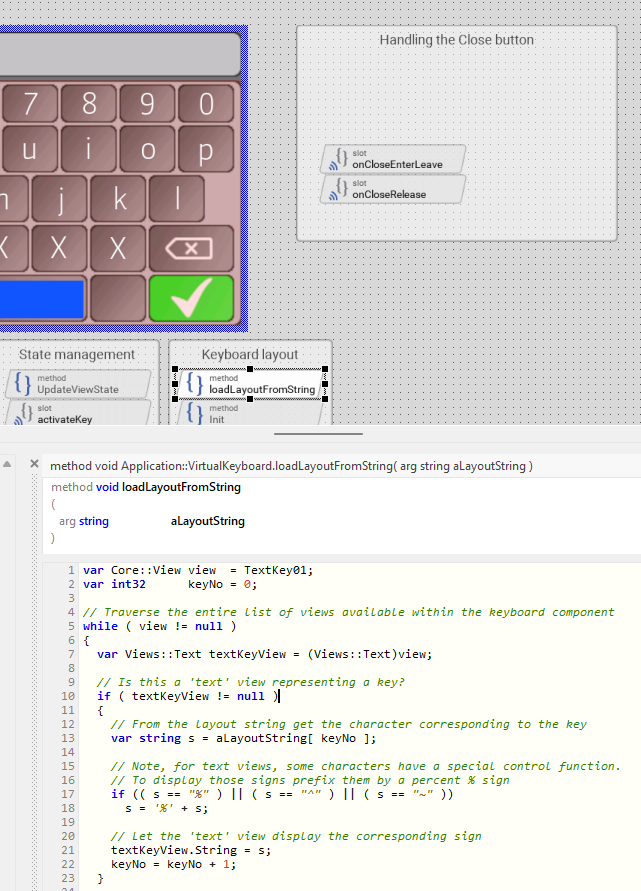
Loaded in the init method with the string "layoutShiftOff".

When hitting Caps Lock or shift the method loads the string with the Uppercase characther, right?

by

Hello Riccardo,

When hitting Caps Lock or shift the method loads the string with the Uppercase characther, right?

yes, see the implementation of the method activateKey. This method processes the activation of a key. If it was the Shift or Caps Lock key, the method reloads the keyboard layout by invoking the method loadLayoutFromString.

Looking at the code i see the keyboard loads the key text from a LayoutString, and the default charachter of the TextKey is an "X".

The keys are represented by Text views. These are pre-configured with the string 'X' so you can recognize them in Composer. In practice, however, the method loadLayoutFromString takes care of assigning the key characters from the passed string to the Text views. To work correctly, it is therefore important that the number of the characters in the layout string does correspond to the number of keys (Text views). If you have added keys, then this mapping is distorted. See also the thread: Adding new keys to virtual keyboard. It explains how the key mapping can be modified.

Does it help you?

Best regards

Paul Banach

Ask Embedded Wizard - Archive

Welcome to the Ask Embedded Wizard archive. This community forum served us well for many years, but we've evolved our support approach!

Your resources:

The Embedded Wizard Online Documentation provides comprehensive documentation, tutorials, examples and ready-to-use software packages.

For dedicated assistance, explore our Embedded Wizard Product Support.

You can still browse the valuable discussions from our community history here.

Embedded Wizard Website | Privacy Policy | Imprint

...