Hello Kavya,
in Embedded Wizard each GUI component manages a local coordinate system with 0,0 position at the top-left corner of the component's area. When several components are embedded one inside another, each component calculates with its own local coordinates. See also the chapter Convert between local and global (screen) positions.
Transferred to your use case:
- The Screen is the Application component (the so-called root object). See also the chapter Assembling the application.
- View1 is a regular component existing (e.g. embedded) within the Application component.
- View2, is a simple view or other component embedded within View1.
- View1 acts as the owner of View2. Similarly, Application acts as the owner of View1. See also Understand the view tree and the Owner relationships.
This expected change in position is to be reflected in the composer while composing the GUI and not dynamically during runtime.
In Composer you edit the appearance of a component. Doing this you can embed in it an instance of another component, which itself contains further views. When you move the embedded component, then all views existing within it move accordingly since their coordinates are relative to their owner. For example, when you embed an instance of some Slider component containing multiple views (rectangles, images, etc.)) and you move the slider, the views existing in the slider follow the movement:
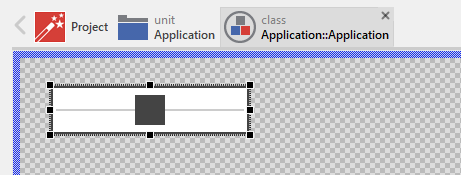
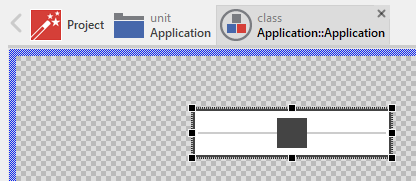
Creating hierarchies already at the design time in the Composer is thus possible.
What is not possible, you can't move (edit) the views existing within the embedded component. In Composer you edit only the actually opened component. To change the position of a view existing within an embedded component, you have to open this component explicitly. Thereupon its content appears in a separate Composer page. To open an embedded component you simply double-click on it. Now you can move the views. For example, when you open the Slider component, you see its implementation and can edit it:
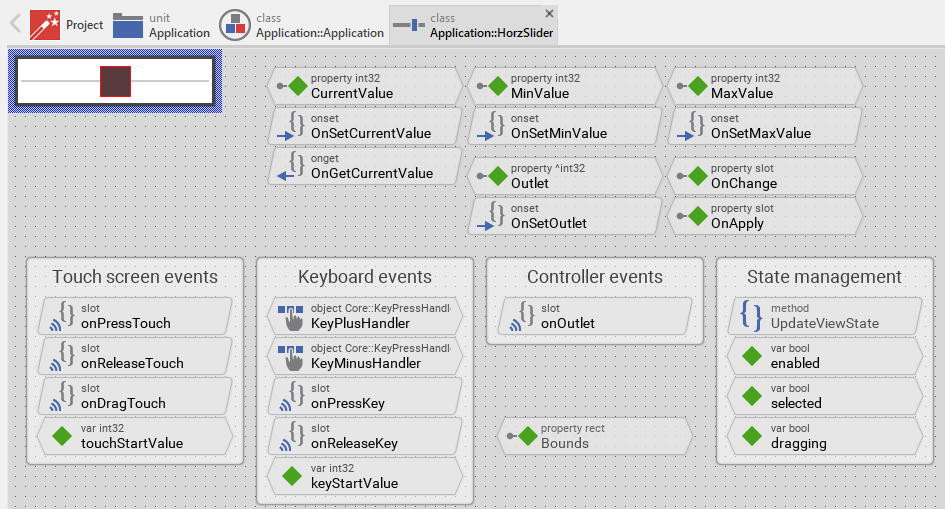
I hope it answers your question.
Best regards
Paul Banach
