758 views
in GUI Development by

Hello,

        We're using OpenSans font from Google in our project. Is there anyway to use variations of the fonts as listed below. I can do a bold, but we have requirements to show semi-bold and extra-bold.

  1. Light
  2. Light Italic
  3. Regular
  4. Regular Italic
  5. Semi-Bold
  6. Semi-Bold Italic
  7. Bold
  8. Bold Italic
  9. Extra-Bold
  10. Extra-Bold Italic

Thanks!

1 Answer

+1 vote
by
 
Best answer

Hi,

it should work when you specify the complete name of the font in the attribute FontName. For example, to get the 'light' version of the font Roboto, specify Roboto Light in the attribute as shown in the screenshot below:
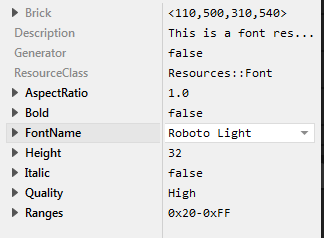
Please note, sometimes the font variant names are localized. The bold version of Arial, for example, is named in German Arial Fett. In such case, using Arial Fett as name results in the same as enabling the attribute Bold for the font Aria.

Best regards

Paul Banach

Ask Embedded Wizard - Archive

Welcome to the Ask Embedded Wizard archive. This community forum served us well for many years, but we've evolved our support approach!

Your resources:

The Embedded Wizard Online Documentation provides comprehensive documentation, tutorials, examples and ready-to-use software packages.

For dedicated assistance, explore our Embedded Wizard Product Support.

You can still browse the valuable discussions from our community history here.

Embedded Wizard Website | Privacy Policy | Imprint

...